Table of Contents
What is Looker Studio?
Google Looker Studio can analyze and consolidate data from different sources (such as Google Ads, Google Analytics, and Google Search Console), visualize the data, and make easy-to-understand and good-looking reports through simple steps.
Looker Studio “Dataset configuration error”
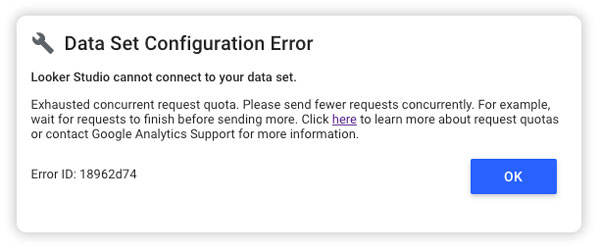
According to Google’s latest official policy on quota, starting 2022-11-07, data from the Looker Studio (formerly Data Studio) connecting to Google Analytics 4 is subject to the quota restrictions of Google Analytics Data API (GA4), resulting in the failure of Looker Studio reports using GA4 data sources display data normally.
Therefore, if you have not made any changes recently to your GA4 reports, but they suddenly show that the dataset configurations have errors, it is most likely due to this quota problem.
GA4 API resource quota
Each API request verifies quotas have not been exhausted and consumes quotas. If any quota is exhausted, the request fails with a relevant error message.
| Quota name | Free | Paid |
|---|---|---|
| Quota name Free Paid Core tokens per resource per day | 25,000 | 250,000 |
| Core tokens per resource per hour | 5,000 | 50,000 |
| Core tokens per project per resource per hour | 1,250 | 12,500 |
| Core concurrent requests per resource | 10 | 50 |
| Core server errors per project per resource per hour | 10 | 50 |
| Realtime tokens per resource per day | 25,000 | 250,000 |
| Realtime tokens per resource per hour | 5,000 | 50,000 |
| Realtime tokens per project per resource per hour | 1,250 | 12,500 |
| Realtime concurrent requests per resource | 10 | 50 |
| Realtime server errors per project per resource per hour | 10 | 50 |
| Funnel tokens per resource per day | 25,000 | 250,000 |
| Funnel tokens per resource per hour | 5,000 | 50,000 |
| Funnel tokens per project per resource per hour | 1,250 | 12,500 |
| Funnel concurrent requests per resource | 10 | 50 |
| Funnel server errors per project per resource per hour | 10 | 50 |
Different numbers of consumption of tokens are calculated based on each request, and the specific consumption depends on the request. Most requests will consume up to 10 tokens.
4 solutions when Looker Studio displays errors
1.Reduce the number of users or data volume of GA4 report.
2.Use data sources that consume less resources to reduce the amount of data extracted.
3.Upgrade to GA4 360 to increase quota.
Potential issues in purchasing Analytics 360
Exposure of confidential information: Built-in reports cannot separate permissions, which may allow non-related personnel to see internal revenue information.
Reduced efficiency of analysis:The built-in custom analysis report cannot easily analyze charts, and needs to switch pages frequently for cross-analysis. The built-in event report is too simple to provide insight into key behaviors.
The report interpretation is difficult, making it hard to analyze product data in an advanced level:There are too many official dimension indicators, and the analysis is time-consuming and labor-intensive. Custom reports require additional custom dimensions and indicators. The procedure is relatively complicated and the learning cost is high.
4. Export data to BigQuery
The most effective solution, but not all dimensions and indicators that you want to see can be directly exported to BigQuery. A professional engineering team is required to process the data (ETL) and recalculate many built-in indicators before they can be displayed in Looker Studio.
Link:Why use BigQuery
Conclusion
No matter which of the above solutions is picked, it is recommended to first assess the needs of your own brand and determine a suitable solution. Vpon Intelligence combines machine learning and AI forecasting, and is a GMP product expert who can assist companies build BigQuery, and provide comprehensive and complete consultation and services to customize solutions for the abovementioned problems.
- Vpon has a team of more than 50 data experts: Specialize in data engineering, data science, AI forecasting, and machine learning to solve business problems.
- Designated data partner for the high-standard financial industry and government services
- Google-certified official partner, GMP product expert, and high-strength GCP combat team to help customers quickly respond to market changes.